

Table of Contents
- Why Counterfeit Sony Electronics Are Worth Spotting
- Step 1: Inspect the Packaging and Build Quality
- Step 2: Run a Sony Camera Serial Number Check
- Step 3: How to Verify Sony Camera Authenticity
- Step 4: Complete Sony Product Registration
- Step 5: Buy From a Sony Authorized Retailer
- Common Mistakes to Avoid When Buying Sony Gear
- Conclusion
- Frequently Asked Questions
Last Updated: October 18, 2026
Why Counterfeit Sony Electronics Are Worth Spotting
Counterfeit electronics are a real problem in the United States, and Sony gear is a frequent target. Fake headphones, cameras, and accessories often look convincing in photos but fail within weeks. The wiring is thin, the batteries are unstable, and there is no warranty behind them.
Knowing how to verify authentic Sony electronics protects your money and your safety, and spotting an authentic Sony product starts with a few simple checks. The U.S. Federal Trade Commission's guidance on counterfeit goods makes clear that fake products carry no manufacturer support and can pose real hazards.
Below, we'll show you exactly how to check a Sony product before and after you buy. The steps take a few minutes each. They work for headphones, cameras, and most accessories.
Step 1: Inspect the Packaging and Build Quality
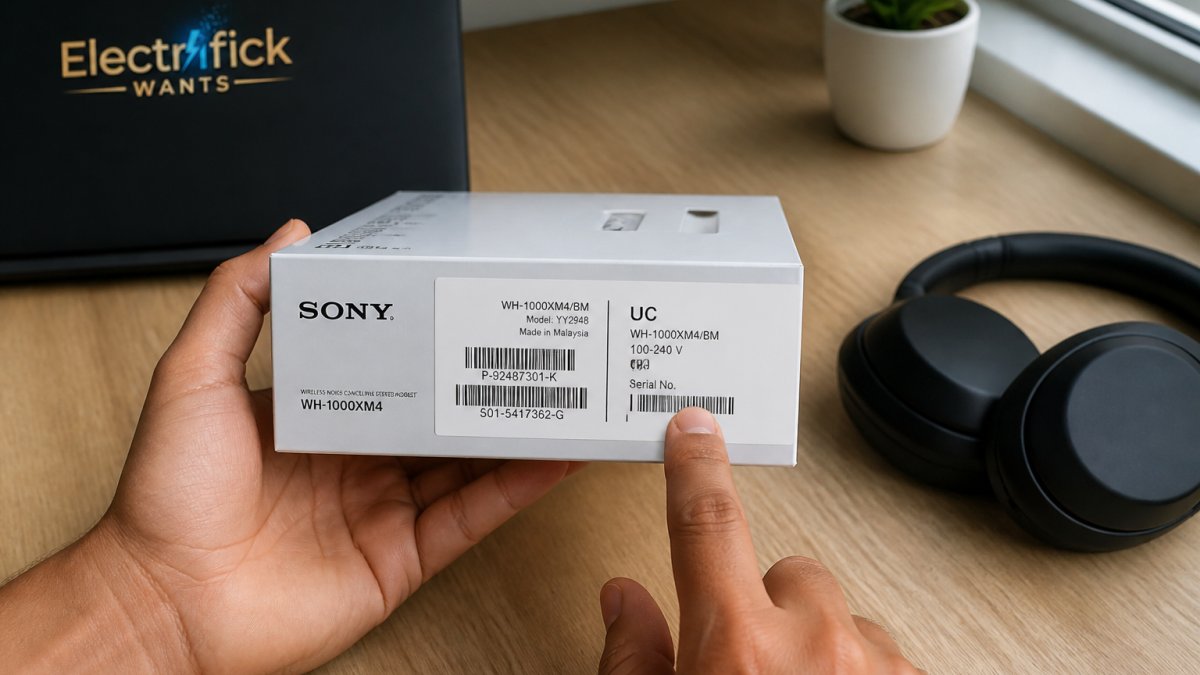
Genuine Sony packaging is crisp, consistent, and well made. Counterfeit boxes usually show it in small ways. Start your inspection before you open anything.
Look for these signs:
- Print quality: Real Sony boxes have sharp text and even color. Fakes look slightly blurry or washed out.
- Fonts and spacing: Genuine labels use consistent fonts. Knockoffs mix weights and misalign logos.
- Holographic seals: Many Sony products carry a security sticker. Tilt it in the light. Real seals shift color cleanly.
- Serial sticker: The sticker should sit flat with clean edges, not bubbled or peeling.
- Build feel: Genuine plastic and metal feel solid. Fakes rattle, flex, or show uneven seams.
Packaging Red Flags to Watch For
- Misspelled words on the box or manual
- A manual printed on thin, gray paper with blurry photos
- No model number, or a model number that doesn't match the product
- Missing regulatory markings on the label
- A seal that looks printed rather than holographic
Step 2: Run a Sony Camera Serial Number Check
A serial number check is the fastest way to confirm a camera is genuine. Every genuine Sony camera carries a unique serial number printed on the body and on the original packaging.
Here is how to run the check:
- Find the serial number on the bottom of the camera or inside the battery door.
- Compare it to the number on the box. They must match exactly.
- Enter the number through Sony's official support portal.
- Confirm the model, region, and warranty status match what you bought.
If the numbers don't match, stop. That mismatch alone is a strong sign of a counterfeit or a gray-market unit. A camera with no verifiable serial number has no warranty path.
Step 3: How to Verify Sony Camera Authenticity
Learning how to verify Sony camera authenticity means checking more than the serial number. The camera body itself tells a story. Genuine Sony cameras have tight tolerances, clean lettering, and firmware that updates without errors.
Check these points:
- Lens mount: Genuine mounts fit lenses smoothly with no grinding.
- Menus: The on-screen menus match Sony's current interface, not a stripped-down copy.
- Firmware: Genuine cameras accept official firmware updates. Fakes reject them.
- Buttons and dials: Real controls click firmly and don't wobble.
- Sensor check: Shoot a plain white wall and look for odd banding or dead zones.
A counterfeit camera often fails the firmware test first. That is your clearest signal.
Step 4: Complete Sony Product Registration
Sony product registration is a simple step that does double duty. It activates your warranty and confirms the product is genuine in Sony's own system.
To register:
Replacement earpads for Sony MDR-RF985R & More →
- Create or sign in to a Sony account.
- Enter your model and serial number.
- Upload your proof of purchase.
- Save the confirmation email.
If registration fails or the serial number is rejected, treat that as a red flag. A genuine product registers cleanly. Registration also gives you a paper trail if the item ever needs service.
Step 5: Buy From a Sony Authorized Retailer
The best defense against counterfeits is buying from a Sony authorized retailer. Authorized sellers get stock directly from Sony, so the serial numbers are valid and the warranty is intact.
How to confirm a seller is authorized:
- Check Sony's official dealer locator before you buy.
- Ask the seller directly for their authorization status.
- Look for clear warranty terms on the product page.
- Avoid sellers who ship from unknown warehouses with no return policy.
At Electrifick Wants, we focus on quality brands and clear product listings, so you know what you're getting before checkout. If you need replacement parts for genuine Sony headphones, our Replacement earpads for Sony MDR-RF985R & More are built to fit specific models exactly, and our Sony WH-1000XM5 Earpad Sweat Covers protect genuine pads from sweat and wear.


For broader consumer protection context, the U.S. Consumer Product Safety Commission tracks product safety issues, including hazards from unsafe imports.
Common Mistakes to Avoid When Buying Sony Gear
Most counterfeit losses come from a handful of avoidable mistakes. Here is what to watch.
| Mistake | Why It Hurts | What to Do Instead |
|---|---|---|
| Chasing the lowest price | Fakes are priced to look plausible | Compare against official retail pricing |
| Skipping the serial check | You lose your only hard proof | Check the serial before paying |
| Buying from unfamiliar sellers | No warranty, no returns | Confirm authorized retailer status |
| Ignoring the box quality | Red flags are visible early | Inspect packaging on arrival |
| Never registering the product | No warranty record | Register within days of purchase |
Conclusion
Counterfeit electronics cost buyers money and leave them with no support when things break. The fix is a short, repeatable routine: inspect the packaging, run the serial check, confirm camera authenticity, register the product, and buy from sellers you can verify.
At Electrifick Wants, we make that easier with curated electronics, clear listings, and fast shipping, plus free shipping on orders over $50. Shop smart. Shop Electrifick Wants.
Frequently Asked Questions
How can I tell if a Sony product is authentic?
Start with the packaging: genuine Sony boxes use crisp printing, consistent fonts, and a serial label that matches the number on the device itself. Then run the serial through Sony's official support tools and register the product on Sony's website. If registration fails or the serial comes back as already registered to someone else, treat it as a red flag. Buying from a Sony authorized retailer is the strongest safeguard, since authorized sellers source directly from Sony and can back the warranty.
Can I verify a Sony product using its serial number?
Yes. Every genuine Sony device carries a unique serial number, usually on a sticker on the box and on the device itself (under the battery, on the bottom panel, or inside the camera body). You can enter that number on Sony's official support site to check model details and warranty status. A serial that returns no record, or that shows a different model than the one you bought, is a strong sign of a counterfeit. Keep a photo of the serial for your records.
Does registering a Sony product prove it is authentic?
Sony product registration is a useful check but not a guarantee on its own. Registration confirms the serial is recognized in Sony's system and helps you claim warranty service, but a skilled counterfeiter can copy a real serial onto a fake unit. Pair registration with a physical inspection, a serial number check, and proof of purchase from a Sony authorized retailer. If all four line up, you have strong evidence the product is genuine.
What should I check before buying Sony electronics from a third-party seller?
Confirm the seller is listed as a Sony authorized retailer, since only authorized sellers can offer Sony's full warranty. Check the listed price against Sony's own store; a deep discount on a current model is a warning sign. Read recent reviews for complaints about fakes or missing warranty cards, and ask the seller in writing whether the item ships with a valid Sony warranty. When you receive it, inspect the packaging, verify the serial, and register the product within the return window.