
How to Choose Professional Tattoo Machines in 2026
Table of Contents
- Step 1: Determine Your Tattooing Style and Workflow
- Rotary vs Coil Tattoo Machines: Which Suits Your Technique?
- Tattoo Machine Stroke Length Explained: Matching Throw to Task
- Best Tattoo Machines for Lining and Shading in 2026
- Power, Ergonomics, and Build Quality: What to Inspect
- Budget vs Professional Gear: Where to Invest Your Money
- Hygiene, Maintenance, and Long-Term Reliability
- Conclusion: Your Checklist for Choosing Professional Tattoo Machines
- Frequently Asked Questions
Last Updated: September 20, 2026
Step 1: Determine Your Tattooing Style and Workflow
The first decision in how to choose professional tattoo machines isn't about the machine at all. It's about your work. Professional tattoo machines are tools built around a technique, not the other way around.
Start by documenting your actual sessions:
- Which styles dominate your bookings: fine-line, blackwork, traditional, realism?
- How long is your average session, and how many clients per day?
- Do you work from a fixed studio or travel between shops and conventions?
A traveling realism artist needs different priorities than a shop-based traditional artist. Write your answers down before you open a single product page.
Rotary vs Coil Tattoo Machines: Which Suits Your Technique?
Rotary tattoo machines drive the needle with a motor and cam system, while coil machines use electromagnetic coils and an armature bar. That mechanical difference shapes everything downstream: weight, sound, stroke feel, and how the needle hits skin.
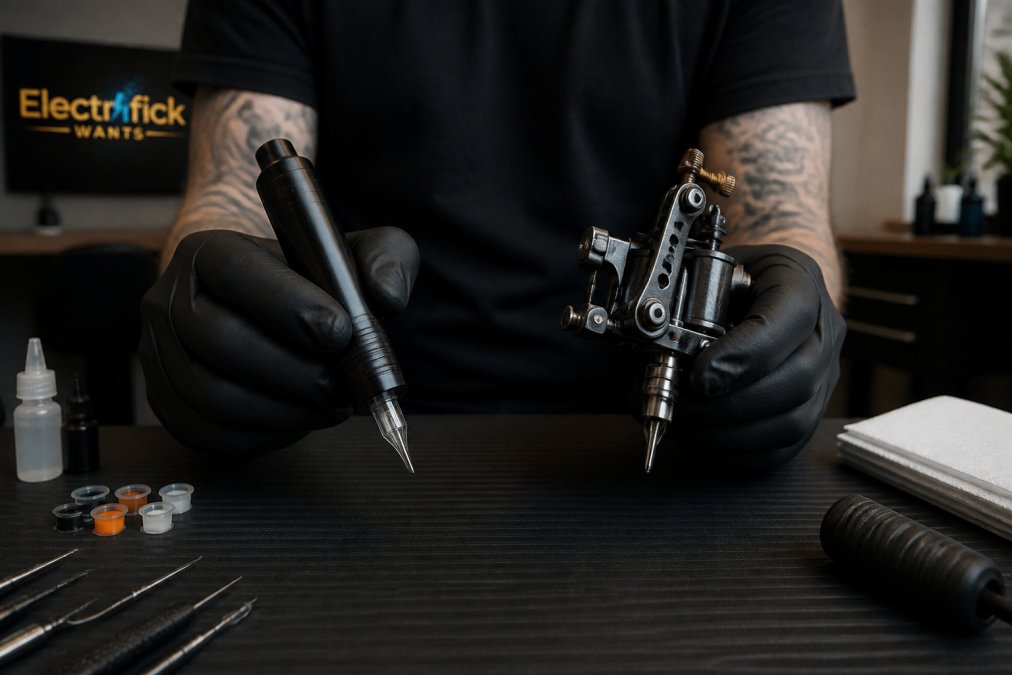
The practical split looks like this:
| Factor | Rotary | Coil |
|---|---|---|
| Weight | Lighter, pen-style balance | Heavier, top-weighted |
| Noise | Quiet hum | Audible buzz |
| Stroke feel | Consistent, adjustable | Mechanical, tunable by hand |
| Best for | Lining, fine detail, color packing | Traditional shading, bold lines |
A common mistake is assuming rotary replaced coil. It didn't. Coil machines still hold loyal followings for traditional work because the give in the armature bar suits certain hand movements. Rotary wins on consistency, lower hand fatigue, and modern cartridge systems.
Tattoo Machine Stroke Length Explained: Matching Throw to Task
Stroke length is the distance the needle travels per cycle, and it's the spec most buyers ignore. A 2.5-3.5 mm stroke suits lining and fine detail. A 4.0-4.5 mm stroke moves more pigment per pass, which suits shading, packing, and bold work.
The Dragonhawk Mast Racer Pro runs a 4.2 mm stroke with a wireless pen design, while the Mast Archer Ultra uses a 4.5 mm stroke for heavier pigment application.

Best Tattoo Machines for Lining and Shading in 2026
For lining, prioritize a short stroke, stable voltage control, and a direct drive motor with enough torque to push through thicker skin without bogging down. For shading, prioritize a longer stroke and smooth low-end response so you can whip shade without skipping.
The POSEIDON-S-LUXE Dual Power Tattoo Pen Set handles both modes through dual power: wireless for mobility, RCA wired for steady output. Two high-capacity batteries are included, and the ergonomic grip is designed to reduce hand fatigue during detailed work.

Two more options worth knowing:
Dragonhawk Mast Racer Pro ($250.00): 4.2 mm stroke, MCORE Pro motor, 115 mm body at 170 g with the battery in the handle for a lower center of gravity. Charges for 5 minutes to deliver 1 hour of runtime. Fully recharges in 40 minutes and runs continuously for up to 5 hours with the MAST ultra-fast charging dock.
Dragonhawk Mast Archer Ultra ($650.00): 4.5 mm stroke, 2300 mAh battery rated for over 6.5 hours, Bluetooth app monitoring, and a precision charging dock.
Pair any of these with the INKSOUL T08FS Wireless Tattoo Transfer Stencil Printer ($168.88) for shadow-capable stencils, and your setup covers the full session.
Power, Ergonomics, and Build Quality: What to Inspect
Check the power supply compatibility first. An RCA connection can provide wired fallback, and a wireless battery pack can offer freedom for traveling work.
Then inspect three things in person:
POSEIDON-S-LUXE DUAL POWER TATTOO PEN →
- Weight distribution. Battery-in-handle designs lower the center of gravity and reduce wrist strain.
- Grip diameter. A grip that's too thick forces a tighter hold and accelerates fatigue.
- Frame material and build quality. Aluminum frames resist flex; cheaper alloys develop play over time.
Budget vs Professional Gear: Where to Invest Your Money
The price spread in this category is wide, and the gap between a $250 wireless pen and a $650 app-connected unit maps to specific internal differences you can verify on a spec sheet.
Here is where the money actually goes as you move up the price tiers:
| Price tier | Typical specs | What you give up |
|---|---|---|
| Entry wireless pen (~$250) | Single battery, fixed or limited stroke options, standard cartridge mount | Runtime per charge, low-end torque consistency, service documentation |
| Mid-tier pen (~$350-$500) | Swappable batteries, adjustable stroke or multiple stroke SKUs, better motor damping | App monitoring, dock charging, premium grip materials |
| Flagship unit (~$650+) | High-capacity battery (2,300 mAh class), Bluetooth/app monitoring, precision charging dock, longer stroke for packing | Nothing meaningful for most artists, you are paying for headroom, not capability |
Where to spend:
- The machine itself. Motor quality and stroke consistency are the two specs you cannot upgrade later.
- The power supply or battery system. If you run wired, an adjustable supply with stable output at low voltage can be beneficial. If you run wireless, a second battery can extend your session time.
- The grip and frame. Battery-in-handle designs can lower the center of gravity and are designed to reduce wrist strain.
Where to save:
- Cartridges. Standard-mount cartridges are commodity items. Buying them in bulk from a reputable supplier costs a fraction of what a proprietary system locks you into.
- Grip tape, barrier film, and practice skin. These are consumables. Price-shop them without guilt.
- Stencil supplies. A mid-priced thermal stencil printer can cover a significant amount of work; the premium tier often offers enhanced speed and shadow capability.
Hygiene, Maintenance, and Long-Term Reliability
Most buying guides stop at performance. This section covers factors that can influence a machine's longevity and user comfort.

Cartridge compatibility: the lock-in nobody warns you about
Before you buy, confirm the machine's grip accepts standard cartridge mounts. While many machines use universal-style mounts, some manufacturers ship proprietary grips that only take their own cartridges. The trade-off can be:
- Universal mount: you can buy cartridges from any reputable supplier, compare membrane tension across brands, and switch if a batch runs stiff. You give up nothing except the manufacturer's bundle discount.
- Proprietary mount: the grip may feel marginally more secure, but you are locked into one supply chain. If that supplier has a stockout or discontinues the line, your machine is sidelined.
For a first professional machine, a universal mount can be a safer call. Check the grip's inner diameter against the cartridge brand you already trust before you commit.
Hygiene and barrier compatibility
Hygiene compatibility can influence how efficiently you can prepare a station between clients. Three things to verify:
- Barrier film fit. The frame and grip should accept standard barrier sleeves. A grip that is too thick or has an irregular profile can make wrapping slower.
- Surface wipe-down. Aluminum and sealed composite frames can wipe clean effectively. Porous or painted finishes may degrade under repeated disinfection and trap residue.
- Autoclavable components. Confirm which parts are rated for autoclaving, usually the grip and any removable contact surfaces, not the motor housing.
Maintenance that actually extends life
- Store batteries at partial charge if the machine sits for weeks. Full-charge storage shortens cell life.
Repetitive strain: the quiet career-ender
Machine weight and vibration can accumulate. A heavier coil setup or a poorly balanced pen may force a tighter grip, which can contribute to hand fatigue. Practical countermeasures include:
Warranty and repair logistics
Before purchase, consider these questions:
- What is the coverage window, and does it cover the motor and battery or only the frame?
- Where does the unit ship for service, and who pays return freight?
- What is the typical turnaround, days or weeks?
- Are replacement batteries and grips sold separately, or is the unit effectively disposable?
Conclusion: Your Checklist for Choosing Professional Tattoo Machines
Choosing professional tattoo machines comes down to matching stroke, power, and ergonomics to the work you actually do, then buying from a source that stands behind the gear. Define your style, pick your stroke length, test the grip, and confirm cartridge and hygiene compatibility before you pay.
Electrifick Wants stocks vetted tattoo equipment including the POSEIDON Dual Power Pen Set, the Dragonhawk Mast Racer Pro and Archer Ultra, and the INKSOUL T08FS stencil printer, with free shipping on orders over $50. Shop Smart.
Frequently Asked Questions
What tattoo machines do professionals use?
Most professionals today use rotary pen machines because they are lighter, quieter, and easier to keep sterile. Many still keep a coil machine for specific lining tasks. The choice depends on your style: rotary pens excel at shading and color packing, while coils offer a distinct hit for bold lines. Look for machines with reliable motors, ergonomic grips, and compatibility with standard cartridges and power supplies.
How does stroke length affect tattoo machine performance?
Stroke length determines how far the needle moves per cycle. A 2.5-3.5 mm stroke is ideal for lining because it delivers a firm, consistent hit. Shading and color packing work better with a 3.5-4.5 mm stroke, which moves more pigment with less effort. If you do both, a 4.0-4.2 mm stroke offers a versatile middle ground. Always match stroke length to your primary technique to reduce hand fatigue and improve results.
Are wireless tattoo machines better for professional use?
Wireless machines offer freedom of movement and eliminate cord drag, which many artists find reduces hand fatigue. However, they depend on battery life. A dual-power option like the POSEIDON-S-LUXE Tattoo Pen Set lets you switch between wireless and wired modes, offering flexibility. For critical lining work, some artists still prefer the consistent output of a wired RCA connection.
What should a beginner look for in a professional tattoo machine?
Beginners should prioritize adjustability and comfort. Look for a machine with a stroke length around 3.5-4.0 mm that handles both lining and shading, an ergonomic grip to reduce strain, and compatibility with standard needle cartridges. A dual-power pen like the POSEIDON-S-LUXE set provides both wireless and wired options, which can help you adapt as you learn. Avoid ultra-cheap machines that lack torque control and reliable power supplies.
