

Table of Contents
- Quick Comparison: Switch Types at a Glance
- Linear vs Tactile vs Clicky Switches: What's the Difference?
- Mechanical Keyboard Switch Actuation Force and Travel Distance
- What Are Hot-Swappable Keyboard Switches?
- How to Choose Gaming Keyboard Switches for Your Genre
- Switch Latency and Debounce Delay in Competitive Gaming
- Maintenance and Lubrication for Long-Lasting Switches
- Conclusion
- Frequently Asked Questions
Last Updated: October 2, 2026
Quick Comparison: Switch Types at a Glance
Learning how to choose gaming keyboard switches starts with one question: what do you want the keys to feel and sound like? Every switch falls into three families, and the family matters more than the brand.

| Switch Type | Feel | Sound | Actuation Force | Best For |
|---|---|---|---|---|
| Linear | Smooth, no bump | Quiet | Light to medium | Fast-paced shooters |
| Tactile | Noticeable bump | Moderate | Medium | Typing and mixed use |
| Clicky | Bump plus click | Loud | Medium to heavy | Users who want audible feedback |
Linear vs Tactile vs Clicky Switches: What's the Difference?
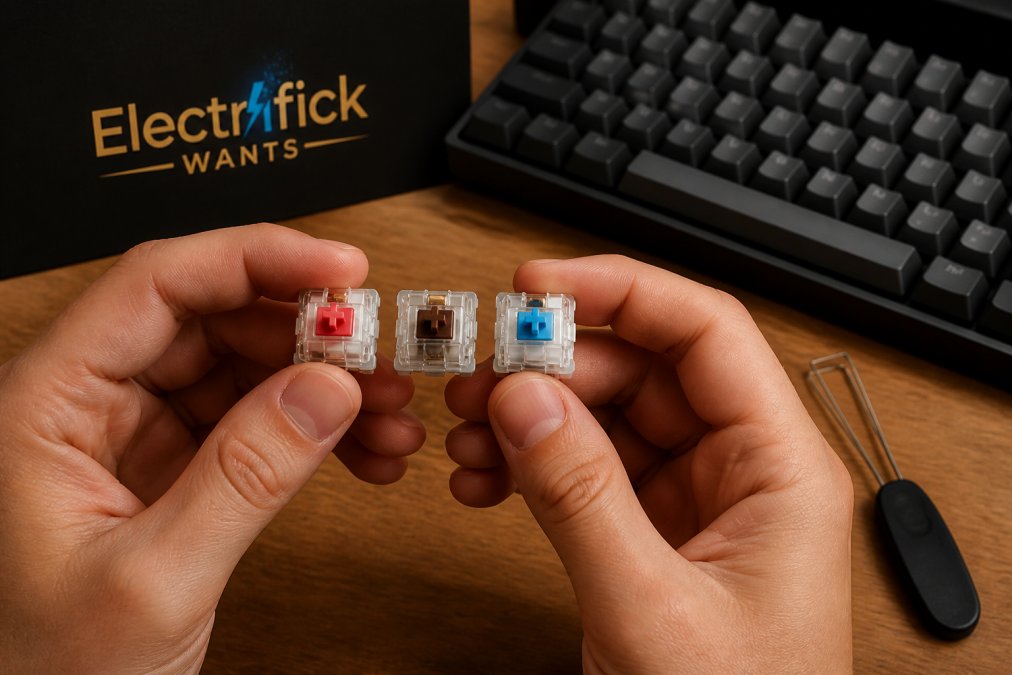
The difference between linear, tactile, and clicky switches comes down to what happens as you press a key: nothing, a bump, or a bump plus a click. That shapes feel, noise, and how fast you can repeat a keypress.
Linear Switches: Smooth and Silent
A linear switch travels straight down with no bump and no click. The keystroke is consistent top to bottom, making rapid repeated presses easier to time, so most competitive players prefer them.
Tactile Switches: A Bump You Can Feel
A tactile switch has a small bump partway down the travel. You feel the actuation point without a click, which many find the best balance for mixed gaming and typing.
Clicky Switches: Audible Feedback
A clicky switch adds an audible click at the actuation point on top of the tactile bump. The sound confirms every press, which some users love and roommates rarely do.
Mechanical Keyboard Switch Actuation Force and Travel Distance
Mechanical keyboard switch actuation force is the pressure needed to register a keypress, measured in grams (gf), while travel distance is how far the key moves from rest to bottom-out, in millimeters. Together they decide how heavy and long each press feels, and matter more for long-session comfort than any marketing label.
| Spec | What It Measures | Typical Range | Why It Matters |
|---|---|---|---|
| Actuation force | Pressure to register a press | Roughly 35-80 gf | Affects finger strain over hours |
| Pre-travel | Distance before registration | Roughly 1.2-2.0 mm | Affects response speed |
| Total travel | Distance to bottom-out | Roughly 3.4-4.0 mm | Affects typing feel and noise |
| Reset point | Distance where the key re-arms | Varies by design | Affects rapid re-presses |
Reading the Numbers Like a Buyer, Not a Spec Sheet
Most switches cluster into bands: light linears around 35-45 gf, medium tactiles around 45-55 gf, and heavy clickies or "black"-style linears around 60-80 gf. Pre-travel on a standard mechanical switch is usually around 2.0 mm; optical and Hall Effect boards often register closer to 1.0-1.5 mm.
How Spring Weight Affects Typing Fatigue
Spring weight is the force the switch pushes back with, and it's the spec most buyers ignore until their fingers ache. Heavier springs feel firm but demand more effort on every keystroke, compounding across a session.
Practical guidance:
- If you already experience hand, wrist, or forearm strain, start at the light end (35-45 gf) and only move up if you find yourself making accidental presses.
- If you rest your hand heavily on the keyboard between inputs, a slightly heavier spring (50-60 gf) can reduce misfires.
- If you play for more than two hours at a stretch, prioritize a lighter spring and a shorter total travel over any other spec.
- Take breaks. No switch weight compensates for a four-hour session with no hand reset.
Pre-Travel vs Total Travel: Which One You Actually Feel
Pre-travel is how far the key moves before the press registers; total travel is how far it moves before it stops. Short pre-travel with long total travel feels snappy on the way down but soft at the bottom, which many players prefer for shooters.
Matching Force and Travel to Your Hand
There is no universal "best" weight. A 45 gf switch that feels perfect for a small-handed player may feel twitchy for someone who rests heavily on the keys. Pick a target band for your genre and hand, buy a tester spanning that band, and commit only after a few days of real use.
What Are Hot-Swappable Keyboard Switches?
Hot-swappable keyboard switches are switches you can pull out and replace without soldering. A hot-swap socket sits on the PCB, so you can change your keyboard's entire feel with a switch puller and a few minutes of work.
Wired Gaming Keyboard & Mouse Combo →
The Compatibility Trap Most Beginners Fall Into
Not every switch fits every hot-swap socket. Two specs decide whether it seats correctly:
- Pin count. Mechanical switches have either three pins (two electrical contacts plus one central plastic post) or five pins (the same two contacts plus two extra plastic legs for stability). A 5-pin switch will not fit a 3-pin-only socket without clipping the two extra legs flush with the housing. A 3-pin switch fits a 5-pin socket fine, but it will wobble slightly because the stabilizing legs are missing.
- Socket type. The two common hot-swap socket designs are the Kailh-style and the Gateron-style. Both accept standard MX-compatible switches, but the retention force and the depth of the socket differ. A switch that seats loosely in one socket may feel firm in another.
Plate Mount vs PCB Mount: Why It Changes the Feel
A switch can be mounted two ways. In a plate-mount board, the switch clips into a metal or plastic plate above the PCB, adding rigidity and a sharper bottom-out. In a PCB-mount board, it sits directly on the PCB with no plate, giving a softer, more flexible feel and often a deeper sound.
What to Check Before You Buy Switches
- Confirm your board is hot-swappable. A soldered board requires desoldering, which is a different project entirely.
- Confirm the socket pin count (3-pin or 5-pin).
- Confirm the switch is MX-compatible and not low-profile or optical.
- Check the switch housing material. Polycarbonate and nylon housings sound different and wear differently.
- Buy one switch first if you can, or a small sample pack, before ordering a full set of 90 or 104.
The Unique Angle: Hot-Swap as an Ergonomic and Budget Strategy
Most guides frame hot-swap as a hobbyist feature. It is also the cheapest way to solve an ergonomic problem: if you develop hand strain on a 60 gf switch, you need a set of 40 gf switches and twenty minutes, not a new keyboard, a fraction of the cost of a replacement board, and it lets you test whether a lighter spring helps before committing to a new layout.
How to Choose Gaming Keyboard Switches for Your Genre
Match the switch to the game before the keyboard. Genre dictates how you press keys, which dictates which switch characteristics help rather than hinder you.
- Fast-paced shooters: Choose light linear switches. Short pre-travel and a clean reset point support rapid strafing and counter-strafing.
- MOBAs and strategy games: Choose tactile switches with a light bump. You get confirmation on ability keys without slowing repeated casts.
- MMOs with heavy keybind use: Choose medium-weight tactile or linear switches. Very light springs cause accidental presses when your hand rests on many keys.
- Fighting games and rhythm games: Choose light linear switches with a short reset point. Fast re-presses depend on how quickly the switch re-arms.
- Mixed gaming and office work: Choose tactile switches with moderate spring weight. They type well and game well without annoying anyone nearby.
Switch Latency and Debounce Delay in Competitive Gaming
Switch latency is the delay between your keypress and the input reaching your game, and debounce delay is the short window a keyboard waits to confirm a press is real rather than a double-bounce. Both affect how inputs feel in competitive play.
Maintenance and Lubrication for Long-Lasting Switches
Switch lubrication reduces friction between the stem and housing, smoothing the keystroke and quieting spring ping. It's the single biggest upgrade you can make to a keyboard you already own, and it costs very little.
The process takes patience more than skill:
- Remove the keycaps and pull each switch with a switch puller.
- Open the switch housing and separate the stem, spring, and base.
- Apply a thin film of lubricant to the stem rails and the spring ends. Less is more; excess lubricant attracts dust.
- Reassemble and reseat the switch, then test each key before replacing keycaps.
Conclusion
Choosing the wrong switch is the most common reason a new keyboard ends up in a drawer. The fix: decide on feel, match spring weight to your hand and genre, and buy a hot-swappable board so you can change your mind without buying a new keyboard.
Frequently Asked Questions
What type of keyboard switch is best for gaming?
Linear switches are the most common choice for gaming because they have no tactile bump, letting you press keys quickly and repeatedly without resistance. Red and speed switches are popular for this reason. That said, tactile switches work well if you prefer knowing when a key registers. The best switch depends on your genre and personal feel preference, not a single universal answer.
Is a red or brown switch better for gaming?
Red switches are linear and silent, making them ideal for fast-paced games where rapid key presses matter. Brown switches are tactile, so you feel a small bump at the actuation point, which can help with typing accuracy. Neither is objectively better for gaming. Many players choose red for shooters and brown for a mix of gaming and typing.
How do actuation force and travel distance affect gaming performance?
Actuation force is the pressure needed to register a keypress, measured in grams. Lighter springs (around 45g) reduce finger fatigue during long sessions, while heavier springs (60g+) offer more control but tire your hands faster. Travel distance is how far the key moves before actuation. Shorter pre-travel means faster input, which matters in competitive play.
Are hot-swappable keyboards worth it for beginners?
Yes, hot-swappable keyboards let you change switches without soldering, so you can try linear, tactile, or clicky types before committing. This is especially useful if you are unsure which feel you prefer. Just check that the keyboard supports the switch pin layout you plan to use, since not all PCBs accept every switch type.